
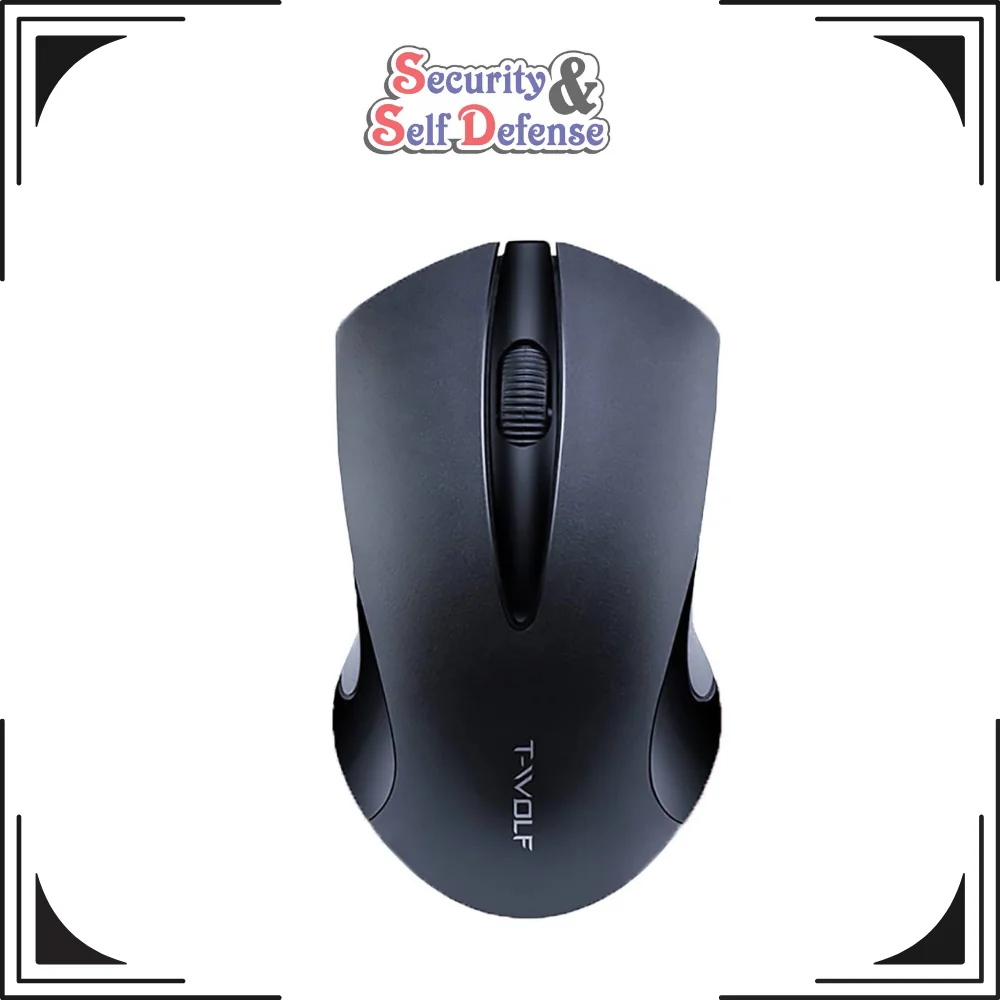
T-Wolf Wireless Mouse
Original price was: R180.00.R65.00Current price is: R65.00.
Free shipping on orders over 5000-10000R!
- Satisfaction Guaranteed
- No Hassle Refunds
- Secure Payments
T-Wolf Wireless Mouse: The Ultimate Gaming and Productivity Companion
When it comes to precision, comfort, and performance, the T-Wolf Wireless Mouse stands out as a top choice for both casual users and professional gamers. Whether you’re using it for work, gaming, or casual browsing, this versatile mouse offers exceptional performance and advanced features, ensuring a seamless user experience. In this comprehensive guide, we’ll explore everything about the T-Wolf Mouse, including its software, connection process, drivers, and different models like the T-Wolf Q13 Wireless Mouse and T-Wolf X8 Wireless Mouse.
What is the T-Wolf Wireless Mouse?
The T-Wolf Wireless Mouse is a high-performance wireless mouse designed to provide users with enhanced functionality and precision. Featuring cutting-edge technology, it is ideal for both casual computing tasks and high-end gaming needs. With a sleek design, ergonomic shape, and customizable features, the T-Wolf Wireless Mouse is one of the best choices for those looking for a reliable, affordable, and feature-packed wireless mouse.
Why Choose the T-Wolf Gaming Mouse?
- Advanced Precision: One of the standout features of the T-Wolf Gaming Mouse is its advanced optical sensor. Whether you’re gaming or working, the mouse offers pinpoint accuracy, ensuring smooth cursor movements. This is crucial for gamers who require precision during fast-paced gaming sessions.
- Ergonomic Design: The T-Wolf Mouse is designed with comfort in mind. Its ergonomic shape allows users to use the mouse for extended periods without discomfort, making it perfect for gaming marathons or long working hours. The shape of the mouse fits naturally in your hand, providing a more relaxed grip.
- Customizable Features: The T-Wolf Wireless Gaming Mouse is highly customizable. Users can tweak settings such as DPI (dots per inch), button assignments, and RGB lighting through the T-Wolf Mouse Software. This allows you to personalize your gaming or work experience to match your preferences.
- Wireless Convenience: Say goodbye to tangled wires! The T-Wolf Wireless Mouse connects seamlessly to your PC or laptop via a stable wireless connection, ensuring a clutter-free workspace and maximum freedom of movement.
T-Wolf Mouse Software: A Game-Changer for Customization
The T-Wolf Mouse Software is a key feature that sets this mouse apart from other options in the market. The software allows users to fine-tune their mouse settings, giving them complete control over various aspects of the device. Here’s a look at what you can do with the T-Wolf Mouse Software:
- DPI Adjustment: You can adjust the DPI settings, which control the sensitivity of the mouse. Whether you’re into fast-paced games or need precision for tasks like photo editing, the software lets you set the DPI to your preferred level.
- Button Mapping: The software allows you to assign custom functions to each button on the mouse, enabling you to streamline your workflow or gaming controls.
- RGB Lighting Customization: The T-Wolf Wireless Mouse often comes with customizable RGB lighting. The software enables you to change the lighting effects and color patterns to match your style or mood.
- Profile Creation: You can create different profiles for various tasks or games. This is ideal for users who switch between gaming and work or those who want different settings for different games.
How to Connect T-Wolf Wireless Mouse?
Connecting your T-Wolf Wireless Mouse is quick and easy. Here’s a simple guide on how to connect the mouse:
- Insert the USB Receiver: Plug the wireless USB receiver into a free USB port on your computer or laptop.
- Power On the Mouse: Turn on your T-Wolf Mouse by switching the power button (usually located on the bottom of the mouse).
- Automatic Connection: The T-Wolf Wireless Mouse should automatically connect to the USB receiver once it’s powered on. The wireless technology ensures that the mouse connects seamlessly without the need for additional software or configuration.
- Install Drivers (if necessary): In some cases, the mouse may require specific drivers to be installed. These drivers can be easily found on the T-Wolf website or included in the product’s manual.
T-Wolf Mouse Driver: How to Install
The T-Wolf Mouse Driver is essential for ensuring that your mouse operates at full capacity. The drivers allow the mouse to communicate effectively with your computer, enabling features such as customizable buttons, DPI adjustments, and RGB lighting. Here’s how you can install the driver:
- Download the Driver: Go to the T-Wolf official website or use the installation CD provided with the mouse to download the correct driver for your model.
- Run the Installer: Once downloaded, double-click the installer and follow the on-screen instructions to complete the installation process.
- Restart Your Computer: After the installation, restart your computer to ensure that the mouse driver is properly integrated into your system.
- Launch the Software: Once the driver is installed, you can launch the T-Wolf Mouse Software to customize settings according to your needs.
Explore the Different Models: T-Wolf Q13 Wireless Mouse and T-Wolf X8 Wireless Mouse
The T-Wolf Q13 Wireless Mouse and T-Wolf X8 Wireless Mouse are both high-end models designed for different needs. Here’s a quick comparison:
- T-Wolf Q13 Wireless Mouse: Known for its ergonomic design, the Q13 is ideal for users looking for a high-quality, affordable wireless mouse for everyday use. It offers solid precision and customizable features, making it perfect for gaming and general use.
- T-Wolf X8 Wireless Mouse: The X8 is a more advanced gaming mouse that comes with a higher DPI range, faster response time, and additional programmable buttons. It’s perfect for competitive gamers who need top-notch performance and quick reactions.
Conclusion
The T-Wolf Wireless Mouse is a great investment for anyone seeking a high-performance, customizable, and comfortable mouse. Whether you’re a casual user, a professional, or a competitive gamer, the T-Wolf Mouse delivers on all fronts with its precision, ergonomic design, and advanced features. With models like the T-Wolf Q13 Wireless Mouse and T-Wolf X8 Wireless Mouse, you can choose the one that best fits your needs. Plus, with the easy-to-use T-Wolf Mouse Software and simple connection process, this mouse ensures a hassle-free experience.
Related products
-
Sale!

-
Sale!
HIKVISION 4MP VARI-FOCAL BULLET
Original price was: R4950.00.R4500.00Current price is: R4500.00. -
Sale!
-
Sale!
Hilook 1080p HD Outdoor Bullet Camera
Original price was: R750.00.R665.00Current price is: R665.00.
Reviews
There are no reviews yet.